Browse the guides
Another LMS
Add Flash Reference to any LMS that supports LTI 1.1 tools.
Most LMSs can add Flash Reference as an LTI 1.1 external tool, even if there's no guide for yours here.
Add Flash Reference as an external tool
In your LMS's settings for external or LTI tools, add a tool with:
- Launch URL (sometimes called the tool URL):
https://flash-reference.com/lti/launch - Consumer key: your Production Consumer Key, from Settings → Production in Flash Reference
- Shared secret: your Production Secret, from the same tab
- Privacy: send users' names and email addresses to the tool
- Deep linking or content selection, if your LMS offers it: on, with the Launch URL as the content selection URL. Instructors can then choose decks from a list.
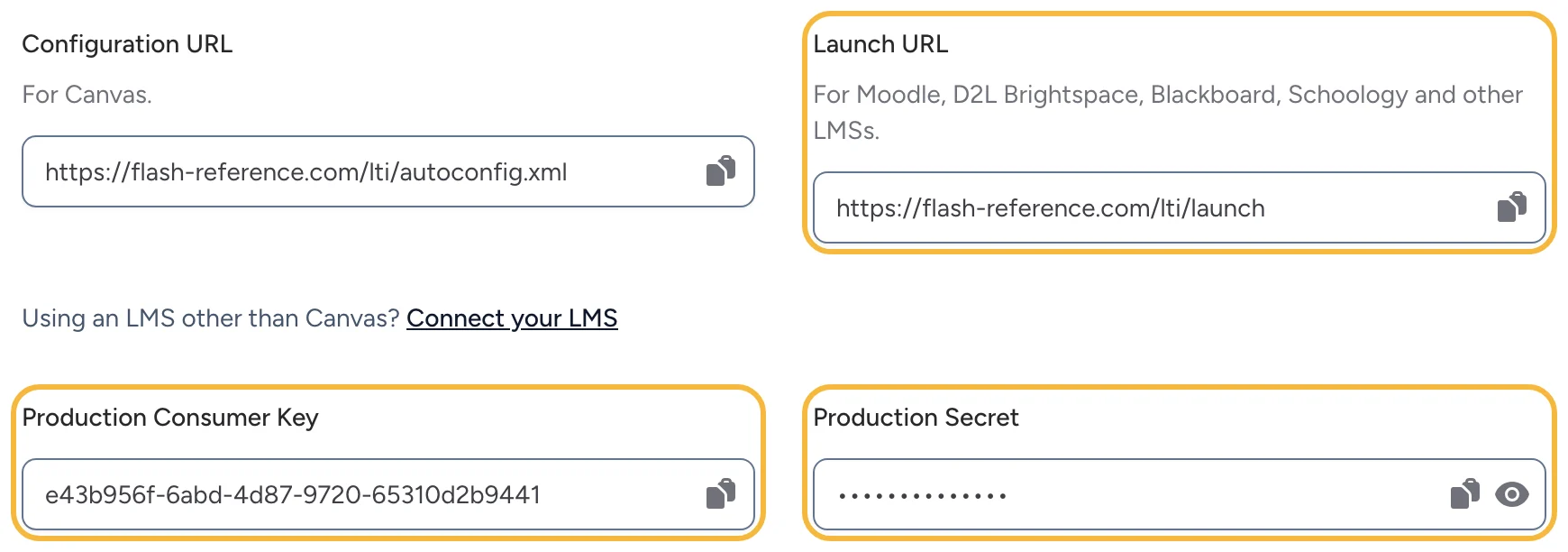
Use the Test tab's key and secret in a test copy of your LMS.
If your LMS supports LTI 1.3, see Another LMS with LTI 1.3.
Check that it works
Add a deck to a course and open it as a student. If your LMS has no way to choose content, contact us and we'll help set up deck links. See also Connecting your LMS.